每晚待机功耗审计:找出你早已忘掉的那 38 W
03:00 全屋安静,自动化读取每一个计量插座并对待机功耗排序。首次运行发现 38 W 的持续负载——一年 333 kWh——来自一台游戏机、一台打印机和一台老式机顶盒。
自动化 YAML
energy-phantom-load-nightly-audit.yaml
# HearthNodes recipe 19 - phantom load audit
alias: "Energy - nightly phantom load audit"
id: hn_energy_phantom_audit
description: "03:00 standby survey of every metering plug, ranked, weekly digest"
mode: single
max_exceeded: silent

trigger:
  - platform: time
    at: "03:00:00"

variables:
  metering_plugs: "{{ states.switch | selectattr('entity_id','search','_plug_') | map(attribute='entity_id') | list }}"
  reporting: >-
    {{ metering_plugs | selectattr('state','ne','unavailable') | list | count }}
  report_ratio: "{{ (reporting | int(0) / metering_plugs | count * 100) | round(0) }}"

condition:
  - condition: state
    entity_id: binary_sensor.house_occupied
    state: "off"
  - condition: numeric_state
    entity_id: sensor.outdoor_temperature
    above: 5
  - condition: template
    value_template: "{{ report_ratio | int(0) >= 80 }}"

action:
  - service: script.rank_standby_loads
    data:
      devices: "{{ metering_plugs }}"
      min_watts: 3
  - service: input_number.set_value
    target:
      entity_id: input_number.house_baseline_watts
    data:
      value: >-
        {{ expand(metering_plugs) | map(attribute='attributes.power_w')
           | map('float', 0) | sum | round(1) }}
  - service: notify.mobile_app_primary
    data:
      title: "Standby audit"
      message: >-
        Total {{ states('input_number.house_baseline_watts') }} W.
        Meter residual {{ states('sensor.meter_unaccounted_watts') }} W.
        Top: {{ states('sensor.standby_worst_offender') }}

# Fewer than 80 percent of plugs reporting -> the audit is skipped rather than
# run on partial data, and the notification says so. Loads on the protected list
# (alarm, smoke, medical, sump, fridge) are never given a cutoff suggestion.
触发器 · time
time
每晚 03:00,此时家庭基线用电最稳定。
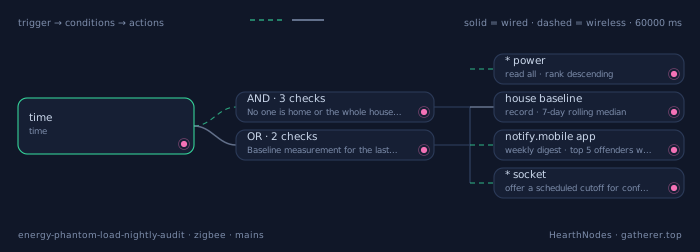
分步说明
- sensor.*_power读取所有计量插座的瞬时功率并按值排序;任何在电器关闭状态下仍取电超过 3 W 的都是候选。
read all · rank descending - sensor.house_baseline保留 7 天滚动中位数,避免某个异常夜晚成为参照。
record · 7-day rolling median - notify.mobile_app每周发送一份摘要,列出待机功耗前五名并折算成每年的 kWh 与金额——瓦特很抽象,钱不抽象。
weekly digest · top 5 offenders with kWh/year - switch.*_socket对每个确认的高耗设备,提供一个定时断电方案,家人按一下即可接受,而不必去编辑自动化。
offer a scheduled cutoff for confirmed offenders
在 03:00 测量,而不是睡前
23:00 时洗碗机可能还在运行,也可能还有人在看电视。03:00 是一个家庭用电最接近真实待机底线的时刻。如果你家确实在 03:00 还活跃,就另选一个安静的整点并保持一致——可比性比具体时间更重要。
把各插座与总表核对
如果插座加总是 45 W,而总表显示 130 W,说明有 85 W 未被计量——门铃变压器、车库开门机、老式报警主机。出人意料的发现通常就藏在这个残差里,而计算它不花任何成本。
把瓦特换算成每年的钱
38 W 听起来微不足道,但一年就是 333 kWh。把每一项发现按你的实际电价折算成年度费用;正是这个数字会让人走过去拔掉机顶盒的插头。请把你使用的电价一并列出,方便核对。
硬件
| 型号 | 协议 | 连接 | 在本链路中的作用 |
|---|---|---|---|
| Metering plugs with 0.1 W resolution | zigbee |
无线 | 分辨率很重要:1 W 分辨率的插座无法把 0.4 W 的待机功耗和零区分开,而大多数有价值的发现都在 0.5 W 到 5 W 之间。 |
| Whole-house energy meter | zigbee |
有线 | 提供用于与各插座加总核对的总额;两者的差就是未计量的负载。 |
| Home/away presence (aggregate) | zigbee |
无线 | 只使用汇总的在家/离家布尔量,因此审计无法推断夜间谁在哪个房间。 |
失效时怎么办
如果上报的插座少于 80 %,本次审计跳过,而不是基于部分数据运行——部分数据会产出错误基线,进而污染接下来一个月的周对比。通知会明确说明审计未执行及原因。